


 Edulux Driver
Your route, one stop at a time.
For drivers and attendants whose company runs on Edulux.
Getting started
From your company's invitation to your first run. Most drivers finish in one sitting.
-
1
Your company adds you
They enter your name and mobile number, then send you their organization code, or a link by text.
-
2
Install the app
Download Edulux Driver. Enter the code, or open the link, and confirm your organization.
-
3
Sign in with your phone
Enter your mobile number. A code arrives by text. No password to remember.
-
4
Fill in your registration
Your details and emergency contact, a scan of your license, your photo and ID, and your company's agreements. Progress is saved, so you can stop and come back.
-
5
Submit for approval
The office reviews it. You're approved, or asked to redo specific items, with a note saying what to fix.
-
6
Upload your documents
Background check and whatever else your company needs. Each one shows whether it's approved, in review, or needed.
-
7
Set up your phone for trips
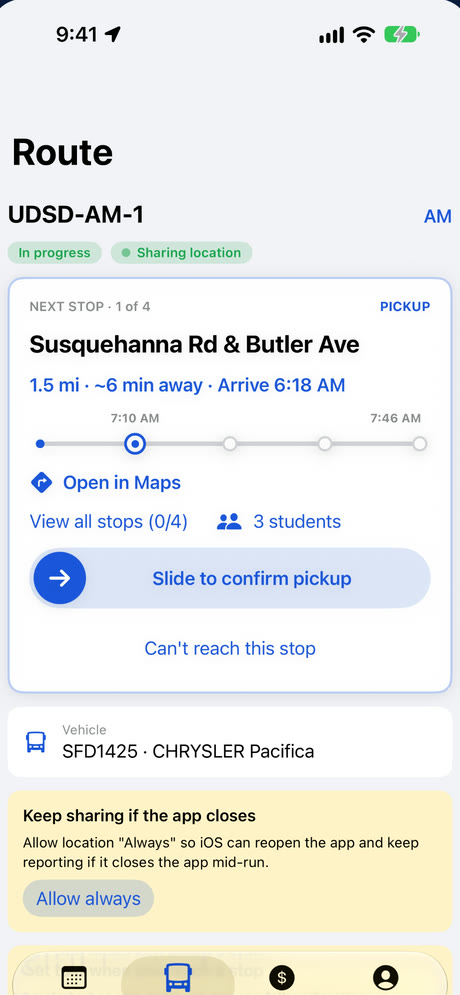
Allow location and notifications. You can look at your runs without them, but you'll need location to start driving.
-
8
Accept your runs
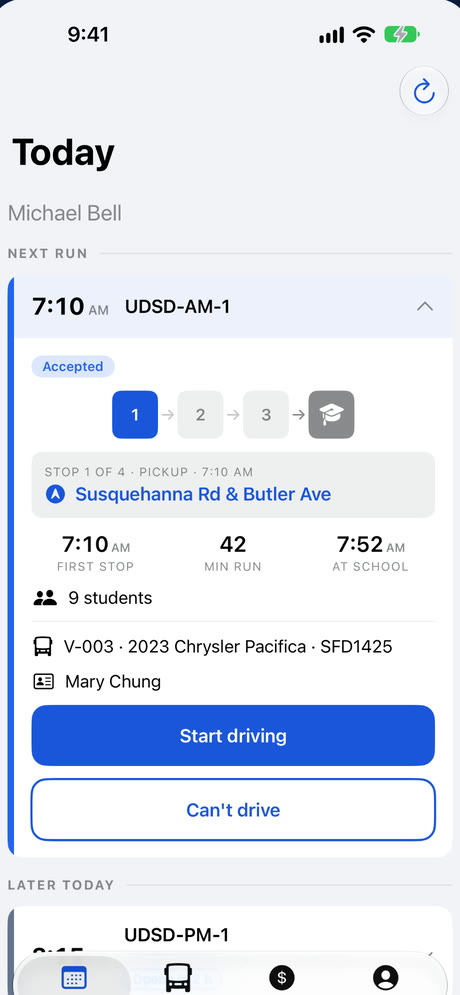
Your runs appear on Today. Accept them, check in on the day, and tap Start driving.
What the app does for you
Directions to each stop
The next stop, its distance, and one tap to open it in your maps app.
Arrivals noticed for you
The app tells you when you reach a stop. Slide to record it.
Who's at each stop
The children to pick up or drop off, their care notes, and a guardian to call.
Mark who didn't ride
Not riding, no-show, or released to an adult, one child at a time. Dispatch sees it right away.
Works without signal
Stops you record with no connection are saved and sent when you're back online.
Report a problem
A breakdown, an accident or a delay goes straight to dispatch, with a photo and where you are.
End-of-trip reminders
When every stop is done, or the vehicle has parked, the app reminds you to end the trip.
Your earnings
What you've earned from the runs you've driven, in its own tab.
Documents at hand
See each document's status in your profile, and upload a new one when it's asked for.
Your location, only while you drive.
You'll always see when it's on. Privacy policy
Need help with the app?